You've been duct-taping JSON parsing onto LLM outputs for months. Regex hacks, fragile prompt instructions like "always respond in valid JSON", retry loops when the model decides to add a friendly preamble. It works until it doesn't — usually in production, usually at 2 AM.
GPT-4 function calling exists to kill that entire class of problems. It's the cleanest interface between natural language and structured code that's shipped to production at scale. If you're not using it properly, you're leaving reliability and capability on the table. Let's fix that.
What Function Calling Actually Does (And What It Doesn't)
First, dispel the magic. GPT-4 doesn't execute your functions. It decides when to call them and what arguments to pass. Your application code does the actual execution. This distinction matters enormously for how you architect things.
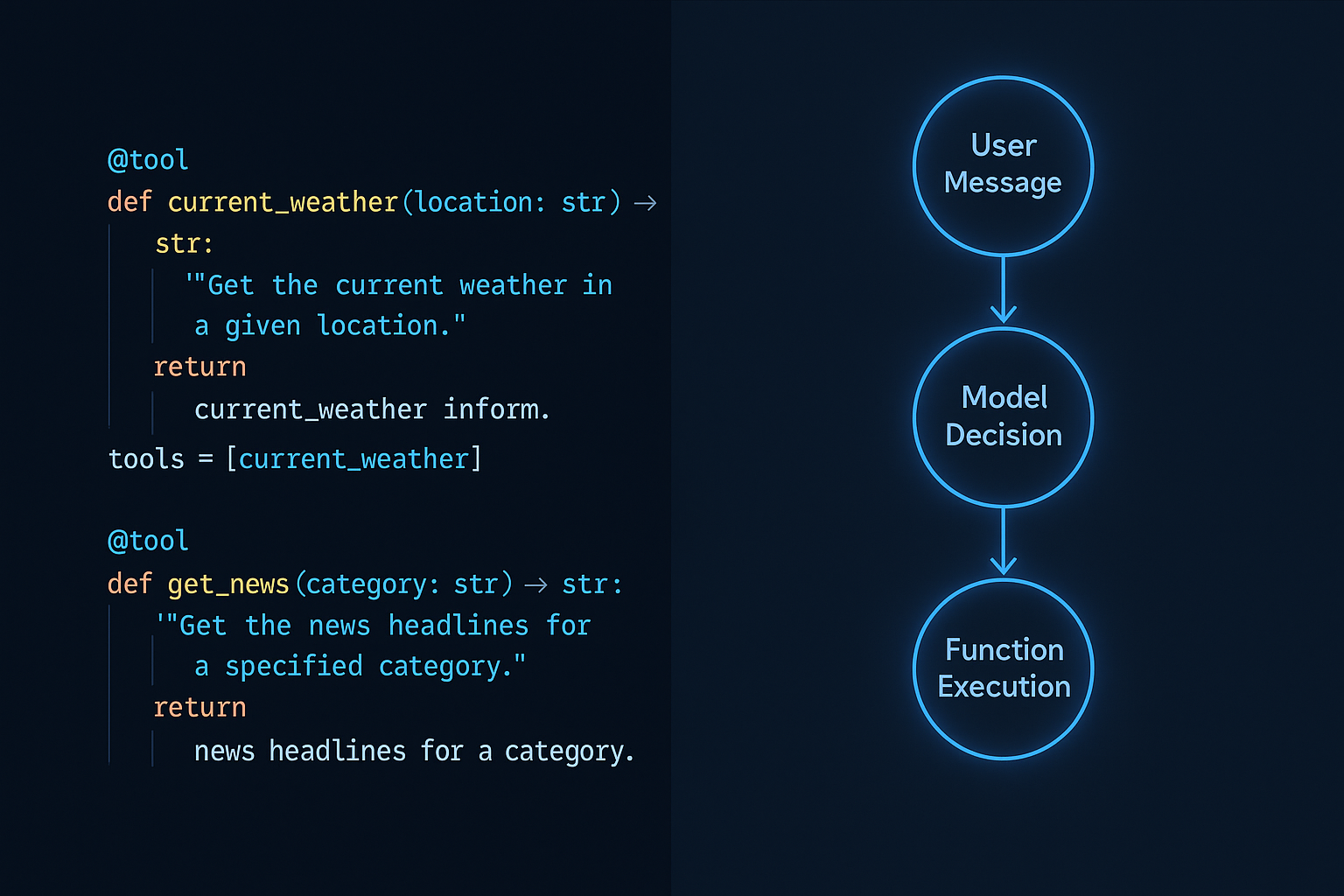
The flow looks like this:
- You send a message plus a list of function definitions (as JSON Schema)
- The model responds with either a normal text reply or a
tool_callsobject specifying which function to call and with what arguments - You execute the function in your code
- You send the result back to the model for a final response
That's it. No magic. Just structured decision-making baked into the model's training.
Your First Function Call: The Complete Walkthrough
Let's build a weather assistant. Classic example, but I'll show you the parts most tutorials skip.
import json
from openai import OpenAI

client = OpenAI()

# Step 1: Define your function schema
tools = [
    {
        "type": "function",
        "function": {
            "name": "get_current_weather",
            "description": "Get the current weather for a specific location. Use this when the user asks about weather conditions, temperature, or forecasts for a place.",
            "parameters": {
                "type": "object",
                "properties": {
                    "location": {
                        "type": "string",
                        "description": "City and country code, e.g. 'London, UK' or 'Tokyo, JP'"
                    },
                    "unit": {
                        "type": "string",
                        "enum": ["celsius", "fahrenheit"],
                        "description": "Temperature unit preference"
                    }
                },
                "required": ["location"]
            }
        }
    }
]

# Step 2: First API call — let the model decide
response = client.chat.completions.create(
    model="gpt-4o",
    messages=[
        {"role": "user", "content": "What's the weather like in Berlin right now?"}
    ],
    tools=tools,
    tool_choice="auto"  # Model decides when to call
)

message = response.choices[0].message
print(message.tool_calls)  # Check if it wants to call a function
The response will have message.tool_calls populated with something like:
[
  {
    "id": "call_abc123",
    "type": "function",
    "function": {
      "name": "get_current_weather",
      "arguments": "{\"location\": \"Berlin, DE\", \"unit\": \"celsius\"}"
    }
  }
]
Note that arguments is a JSON string, not an object. Parse it explicitly — don't assume.
# Step 3: Execute your actual function
def get_current_weather(location: str, unit: str = "celsius") -> dict:
    # In reality, call a weather API here
    return {
        "location": location,
        "temperature": 18,
        "unit": unit,
        "condition": "Partly cloudy",
        "humidity": 65
    }

# Step 4: Process the tool calls
messages = [
    {"role": "user", "content": "What's the weather like in Berlin right now?"},
    message  # Include the assistant's tool call message
]

if message.tool_calls:
    for tool_call in message.tool_calls:
        func_name = tool_call.function.name
        func_args = json.loads(tool_call.function.arguments)

        # Route to the right function
        if func_name == "get_current_weather":
            result = get_current_weather(**func_args)

        # Append the tool result
        messages.append({
            "role": "tool",
            "tool_call_id": tool_call.id,  # Must match the call ID
            "content": json.dumps(result)
        })

# Step 5: Final response with context
final_response = client.chat.completions.create(
    model="gpt-4o",
    messages=messages,
    tools=tools
)

print(final_response.choices[0].message.content)
# "The current weather in Berlin is 18°C and partly cloudy with 65% humidity."
Writing Function Descriptions That Actually Work
The quality of your function descriptions directly controls how reliably the model invokes them. This is where most developers underinvest.
Bad description: "Gets weather data"
Good description: "Get the current weather for a specific location. Use this when the user asks about weather conditions, temperature, or forecasts for a place. Do not use for historical weather data."
The good description answers three questions the model needs:
- What does it do? Get current weather
- When should I call it? When user asks about weather/temperature/forecasts
- When should I NOT call it? Historical data
Apply the same rigor to parameter descriptions. If location just says "A location", you'll get inconsistent formats. If it says "City and country code, e.g. 'London, UK'", you get consistent, usable output.
Controlling Tool Choice: Auto, Required, and Forced
The tool_choice parameter gives you three modes that matter in practice:
# Auto: Model decides (default, good for most cases)
tool_choice="auto"

# None: Model will never call a function
tool_choice="none"

# Required: Model MUST call at least one function
tool_choice="required"

# Force a specific function
tool_choice={"type": "function", "function": {"name": "get_current_weather"}}
Use required when you need guaranteed structured output — for example, an extraction pipeline where a non-function response means something broke. Use forced function calls when you're building a specific workflow step and don't want the model freelancing.
This pairs naturally with what we covered in prompt engineering for agentic workflows — controlling the decision surface is as important as the tools themselves.
Parallel Function Calls: Handling Multiple Tool Calls
GPT-4 can call multiple functions in a single response. If a user asks "Compare the weather in Tokyo and London", you might get two tool calls back simultaneously.
import asyncio

async def handle_parallel_tool_calls(message, messages):
    """Process multiple tool calls concurrently"""
    if not message.tool_calls:
        return messages

    # Execute all tool calls concurrently
    async def execute_tool_call(tool_call):
        func_args = json.loads(tool_call.function.arguments)

        if tool_call.function.name == "get_current_weather":
            # In production, this would be an async HTTP call
            result = get_current_weather(**func_args)

        return {
            "role": "tool",
            "tool_call_id": tool_call.id,
            "content": json.dumps(result)
        }

    tool_results = await asyncio.gather(
        *[execute_tool_call(tc) for tc in message.tool_calls]
    )

    messages.append(message)
    messages.extend(tool_results)
    return messages
Always process all tool calls from a single response before sending results back. Sending partial results causes model confusion and unpredictable behavior.
Using Function Calling for Structured Data Extraction
Here's a pattern that's underused: function calling as a structured extraction primitive. You don't need an actual function to run — just define the schema you want and force a call.
extraction_tools = [
    {
        "type": "function",
        "function": {
            "name": "extract_job_posting",
            "description": "Extract structured information from a job posting",
            "parameters": {
                "type": "object",
                "properties": {
                    "job_title": {"type": "string"},
                    "company": {"type": "string"},
                    "salary_min": {"type": "number", "description": "Minimum salary in USD"},
                    "salary_max": {"type": "number", "description": "Maximum salary in USD"},
                    "required_skills": {
                        "type": "array",
                        "items": {"type": "string"}
                    },
                    "remote_policy": {
                        "type": "string",
                        "enum": ["remote", "hybrid", "on-site", "unknown"]
                    }
                },
                "required": ["job_title", "company", "required_skills", "remote_policy"]
            }
        }
    }
]

response = client.chat.completions.create(
    model="gpt-4o",
    messages=[
        {"role": "system", "content": "Extract structured data from job postings accurately."},
        {"role": "user", "content": job_posting_text}
    ],
    tools=extraction_tools,
    tool_choice={"type": "function", "function": {"name": "extract_job_posting"}}
)

extracted = json.loads(response.choices[0].message.tool_calls[0].function.arguments)
This is more reliable than asking for JSON in a system prompt. The model is trained to produce valid arguments for function calls — that constraint bakes in the validation you'd otherwise write yourself. For larger extraction pipelines, combine this with the approaches in our RAG system guide to process retrieved documents at scale.
Production Error Handling You Actually Need
Three failure modes to handle explicitly:
import json
from typing import Optional

def safe_execute_tool_call(tool_call, function_registry: dict) -> dict:
    """Robust tool call execution with proper error handling"""
    func_name = tool_call.function.name

    # 1. Function doesn't exist in your registry
    if func_name not in function_registry:
        return {
            "role": "tool",
            "tool_call_id": tool_call.id,
            "content": json.dumps({
                "error": f"Function '{func_name}' not found",
                "available_functions": list(function_registry.keys())
            })
        }

    # 2. Argument parsing fails (malformed JSON from model)
    try:
        func_args = json.loads(tool_call.function.arguments)
    except json.JSONDecodeError as e:
        return {
            "role": "tool",
            "tool_call_id": tool_call.id,
            "content": json.dumps({"error": f"Invalid arguments: {str(e)}"})
        }

    # 3. Function execution fails
    try:
        result = function_registry[func_name](**func_args)
        return {
            "role": "tool",
            "tool_call_id": tool_call.id,
            "content": json.dumps(result)
        }
    except Exception as e:
        # Return the error to the model — it can adapt
        return {
            "role": "tool",
            "tool_call_id": tool_call.id,
            "content": json.dumps({
                "error": str(e),
                "hint": "The function failed. Try different parameters or inform the user."
            })
        }
Returning errors back to the model (rather than crashing) is often the right call. GPT-4 can recover, retry with different arguments, or gracefully tell the user something went wrong. This resilience pattern becomes critical when you're running multi-step agent loops — see our piece on AI agent production safety for the broader picture.
Function Calling vs. Structured Outputs: When to Use Which
OpenAI also offers response_format: {type: "json_schema"} (Structured Outputs). Here's the honest comparison:
| Scenario | Use |
|---|---|
| You need to execute real code/APIs | Function calling |
| Pure data extraction, no execution | Either (Structured Outputs slightly simpler) |
| Multiple actions in one turn | Function calling (parallel calls) |
| Agent with tool access | Function calling |
| Simple classification or parsing | Structured Outputs |
If you're building anything agentic — anything with memory, multi-step reasoning, or external tool access — function calling is the right primitive. It's the foundation that frameworks like LangGraph are built on, which is worth understanding if you're choosing between LangGraph and LangChain for your next project.
Practical Takeaways
- Write function descriptions like documentation for a smart junior dev — explain what it does, when to use it, and when not to
- Always parse
argumentswithjson.loads()— it's a string, not an object, and you need to handle parse failures - Match
tool_call_idexactly when returning results — mismatches cause silent failures - Handle all tool calls from a response before the next turn — partial execution confuses the model state
- Return errors to the model as tool results — it can often recover without you needing to restart
- Use forced tool choice for extraction pipelines — more reliable than prompt-based JSON requests
- Test with
tool_choice="required"in staging to verify your schemas are well-formed before going toauto
Function calling is the interface between natural language and your software stack. Get the schema definitions right, handle the execution layer defensively, and you'll have a foundation solid enough to build real production systems on — not just demos.
If you're thinking about cost implications of running function-heavy workflows, our guide on reducing OpenAI API costs covers where the tokens go and how to manage them without gutting quality.